






Promo ends in
US$ 141.00
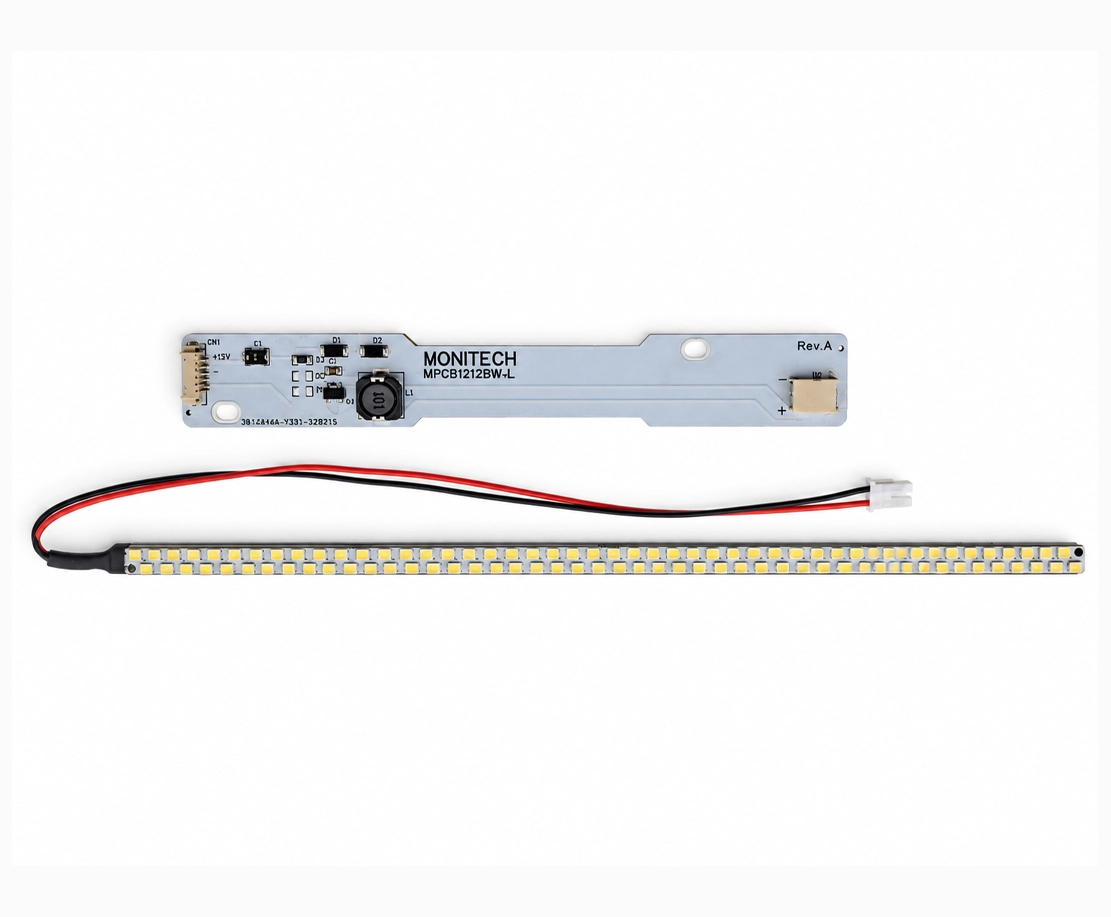
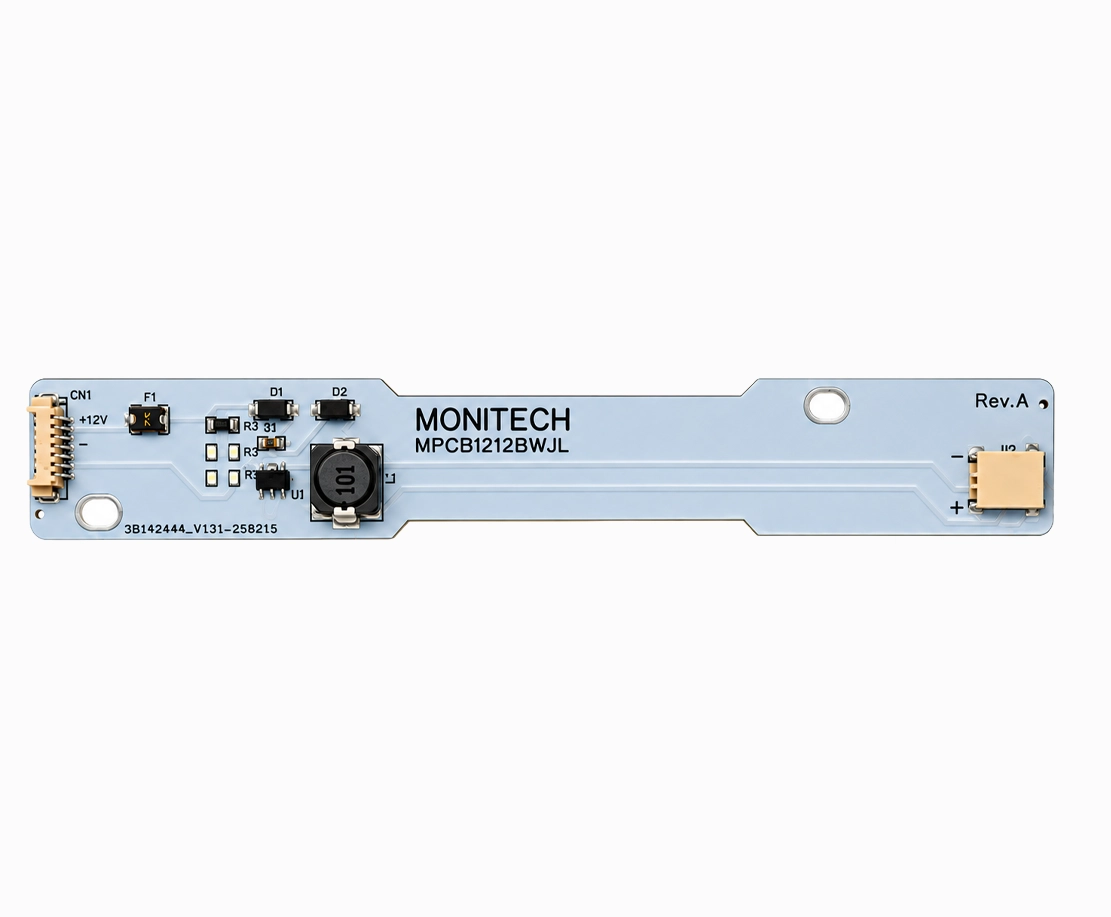
Restore the brightness and visibility of your industrial display with the Monitech MB121S1DG41 LED Backlight for Sharp LQ121S1DG41 LCD Panel. This 12.1-inch LED backlight replacement is designed for compatible Makino and Multivac terminals equipped with the Sharp LQ121S1DG41 LCD panel. Ideal for addressing dim, aging, or failed backlighting, this replacement provides a practical solution for maintaining screen visibility and extending the usable life of existing industrial display equipment without replacing the entire LCD assembly.
| Product Information | Details |
|---|---|
| Product Model | MB121S1DG41 LED Backlight for Sharp LQ121S1DG41 LCD Panel |
| Replacement Type | LED Backlight Replacement for Industrial LCD Panel |
| Original LCD Panel Model | Sharp LQ121S1DG41 |
| Screen Size | 12.1-inch LCD Panel |
| Compatibility |
Important: Verify the original LCD panel model before ordering, as compatibility depends on the installed display. |
| Features |
|
| Application | Backlight replacement for Sharp LQ121S1DG41 LCD panels installed in compatible Makino machine terminals and Multivac industrial equipment. Suitable for servicing displays with reduced brightness or nonfunctioning backlighting, subject to proper fault diagnosis. |
| What’s Included | Monitech MB121S1DG41 LED Backlight Replacement. Confirm any required driver, wiring, or installation accessories before ordering. |
| Need Help? | Not sure whether this LED backlight is compatible with your Makino or Multivac terminal? Contact Us with your terminal model and LCD panel part number for assistance. |
Share:
Promo ends in
US$ 141.00
Restore the brightness and visibility of your industrial display with the Monitech MB121S1DG41 LED Backlight for Sharp LQ121S1DG41 LCD Panel. This 12.1-inch LED backlight replacement is designed for compatible Makino and Multivac terminals equipped with the Sharp LQ121S1DG41 LCD panel. Ideal for addressing dim, aging, or failed backlighting, this replacement provides a practical solution for maintaining screen visibility and extending the usable life of existing industrial display equipment without replacing the entire LCD assembly.
| Product Information | Details |
|---|---|
| Product Model | MB121S1DG41 LED Backlight for Sharp LQ121S1DG41 LCD Panel |
| Replacement Type | LED Backlight Replacement for Industrial LCD Panel |
| Original LCD Panel Model | Sharp LQ121S1DG41 |
| Screen Size | 12.1-inch LCD Panel |
| Compatibility |
Important: Verify the original LCD panel model before ordering, as compatibility depends on the installed display. |
| Features |
|
| Application | Backlight replacement for Sharp LQ121S1DG41 LCD panels installed in compatible Makino machine terminals and Multivac industrial equipment. Suitable for servicing displays with reduced brightness or nonfunctioning backlighting, subject to proper fault diagnosis. |
| What’s Included | Monitech MB121S1DG41 LED Backlight Replacement. Confirm any required driver, wiring, or installation accessories before ordering. |
| Need Help? | Not sure whether this LED backlight is compatible with your Makino or Multivac terminal? Contact Us with your terminal model and LCD panel part number for assistance. |
Interested in Net 30 Payment Terms or have questions in mind? Contact us for further details:
|
|---|
Restore the brightness and visibility of your industrial display with the Monitech MB121S1DG41 LED Backlight Replacement, designed specifically for the Sharp LQ121S1DG41 LCD Panel used in compatible Makino and Multivac terminals. This high-quality 12.1-inch LED backlight provides a practical replacement solution for dim, aging, or failed LCD backlighting, helping restore clear screen visibility and reliable equipment monitoring. Designed for industrial display maintenance, the MB121S1DG41 allows you to address backlight issues without replacing the entire LCD panel when the original display remains functional.
| Product Description | 12.1-inch LED Backlight Replacement for Makino / Multivac Terminal with Sharp LQ121S1DG41 LCD Panel |
|---|---|
| Condition | New: A brand-new, unused, unopened, undamaged item in its original packaging (where packaging is applicable). |
| Brand | Monitech |
| SKU | MB121S1DG41 |
| Compatibility | Sharp LQ121S1DG41 LCD panels installed in compatible Makino and Multivac industrial terminals. Verify the original LCD panel model before ordering. |
| Model | MB121S1DG41 / Sharp LQ121S1DG41 |
| Controller Platform | Makino and Multivac industrial terminals equipped with the Sharp LQ121S1DG41 LCD panel |
| Accessories | LED backlight replacement assembly designed for the specified Sharp LCD panel. Please contact Monitech to confirm the included installation accessories, cable connections, and any additional requirements for your equipment. |
| Type | 12.1-inch LED Backlight Replacement |
| UPC | Does Not Apply |
| EAN | Does Not Apply |
| Warranty | Read our warranty details for our products: TERMS OF WARRANTY |
| Return | Returns are accepted subject to our return policy. Our standard return policy includes a 10% restocking fee. However, please contact us for more information. |
| Support | Click here to make a request for customer service. |
The Monitech MB121S1DG41 is a 12.1-inch LED backlight replacement designed for the Sharp LQ121S1DG41 LCD panel used in compatible Makino and Multivac industrial terminals. It replaces the display's backlighting system to help restore screen brightness and visibility without requiring replacement of the entire LCD panel, provided the original panel is still functioning properly.
The MB121S1DG41 LED backlight is designed for Makino and Multivac industrial terminals equipped with the Sharp LQ121S1DG41 LCD panel. Compatibility is determined by the installed LCD panel model rather than the machine manufacturer alone. Before ordering, check the part number printed on your existing LCD panel. If you are unsure about your terminal's compatibility, contact Monitech with your machine model and LCD panel part number.
No. The MB121S1DG41 is a backlight replacement, not a complete LCD screen replacement. It is designed to restore illumination when the existing Sharp LQ121S1DG41 LCD panel is still operational but its backlight has become dim or stopped working. If the LCD panel has physical damage, broken pixels, display lines, or other image-related faults, replacing the backlight alone may not resolve the problem.
Common signs of a failing LCD backlight include:
These symptoms can indicate a backlight problem, but they may also result from a faulty inverter, power supply, connection, or LCD panel. Proper diagnosis is recommended before replacing components.
A failed backlight may leave the LCD panel producing an image without sufficient illumination to see it clearly. In some cases, an image may be faintly visible when a flashlight is directed at the screen from an angle. If the image remains present but the illumination is missing, the backlight or its power circuitry may be responsible.
However, if the screen shows permanent lines, distorted graphics, missing image sections, or physical damage, the LCD panel itself may be faulty. A trained technician should inspect the display and its electrical connections before determining which component needs replacement.
An LED backlight uses light-emitting diodes to illuminate an LCD screen, while a CCFL backlight uses cold cathode fluorescent lamps. LED technology generally offers several advantages, including:
The MB121S1DG41 provides an LED backlight replacement solution for the specified Sharp LCD panel. Any electrical conversion requirements, including LED driver compatibility, should be confirmed before installation.
Installation should be performed by a qualified maintenance technician or someone experienced with industrial LCD assemblies. Replacing an internal backlight may require opening the terminal, accessing the LCD assembly, and handling delicate display components.
Before starting, disconnect the equipment from its power source, follow appropriate lockout/tagout procedures, and allow any stored electrical energy to discharge according to the equipment manufacturer's service instructions. Never work on an energized display assembly.
For assistance with installation requirements, contact Monitech Support.
Replacing an LCD backlight generally does not require changing the machine's control program because the backlight provides illumination rather than controlling the display's software or machine functions.
However, electrical connections may need to be adapted depending on the original backlight system and the supplied LED driver configuration. Do not assume that the replacement is electrically interchangeable with the original backlight without checking the installation instructions.
Contact Monitech to confirm the wiring and driver requirements for your MB121S1DG41 LED backlight replacement.
The product is supplied as the Monitech MB121S1DG41 LED Backlight Replacement for the Sharp LQ121S1DG41 LCD panel. The exact package contents, including any LED driver, connection cables, mounting components, or installation instructions, should be confirmed before ordering.
To verify what is included with your replacement, contact our support team and reference SKU MB121S1DG41.
The MB121S1DG41 is specifically intended for the Sharp LQ121S1DG41 LCD panel. Other Sharp 12.1-inch LCD models may have different backlight dimensions, mounting arrangements, electrical requirements, or connections.
A matching screen size alone does not guarantee compatibility. Always verify the complete LCD model number before purchasing. For other Sharp LCD panels, ask Monitech about a suitable replacement.
It depends on the cause of the problem. If the LCD panel is generating an image but the backlight has failed, replacing the backlight may restore normal visibility.
However, a completely black screen may also indicate problems with the terminal's power supply, LCD controller, signal connections, inverter, or the LCD panel itself. If the machine does not power on or the display receives no video signal, a backlight replacement alone will not resolve the underlying fault.
Diagnose the source of the failure before ordering replacement components.
A functioning LED backlight replacement can help restore visibility when an existing display has become dim because of aging or failed backlighting. This can make machine information, operating parameters, and on-screen controls easier to read.
Actual brightness depends on the condition of the LCD panel, the LED backlight assembly, the driver configuration, and the terminal's display settings. A replacement backlight will not correct image defects caused by damaged LCD electronics or display layers.
Traditional CCFL-backlit displays commonly use a high-voltage inverter to power fluorescent backlight lamps. LED backlights generally require a compatible LED driver instead.
Whether the original inverter must be disconnected, removed, or replaced depends on the electrical design of the replacement assembly. Never connect an LED backlight directly to a CCFL inverter unless the product's manufacturer specifically provides instructions allowing that configuration.
Check the MB121S1DG41 installation requirements with Monitech before making electrical changes.
The LCD model number is typically printed on a manufacturer's label attached to the back or side of the LCD panel assembly. To locate it, a qualified technician may need to safely open the terminal housing and inspect the display.
Look for the exact designation LQ121S1DG41. Do not rely solely on the Makino or Multivac machine model because different equipment configurations may use different LCD panels.
If you are unsure, take a clear photo of the panel label and send it to Monitech for compatibility assistance.
Yes, when the existing LCD panel and terminal electronics remain operational, replacing a failed backlight can help keep the original equipment in service.
A targeted backlight replacement may be more practical than replacing an entire terminal when the primary problem is poor screen illumination. This approach can help maintenance teams preserve existing equipment and reduce unnecessary component replacement.
However, replacing the backlight does not repair other aging or defective terminal components.
If the display remains dark after installing the replacement, verify the following:
Electrical tests should only be performed by qualified personnel using appropriate safety procedures. If the issue continues, contact Monitech Support for troubleshooting assistance.
To help maintain your LCD display and replacement backlight:
Following the terminal manufacturer's maintenance recommendations can help reduce the risk of premature display component failure.
The Monitech MB121S1DG41 LED Backlight Replacement is subject to Monitech's applicable product warranty terms. Warranty coverage, limitations, and eligibility are described in our Terms of Warranty.
For questions about warranty coverage for this specific SKU, please contact our customer support team.
Returns are accepted subject to Monitech's standard return policy, which includes a 10% restocking fee. Return eligibility may depend on the condition of the product and the circumstances of the return.
Before sending a product back, contact Monitech to confirm the return procedure and applicable conditions.
For the most accurate compatibility verification, provide Monitech with the following information:
Our team can help review your equipment information and identify the appropriate replacement. Contact Monitech Support before ordering if you need assistance.


We are one message away or call us from Monday to Friday.
Reviews
There are no reviews yet.