






Promo ends in
US$ 399.00
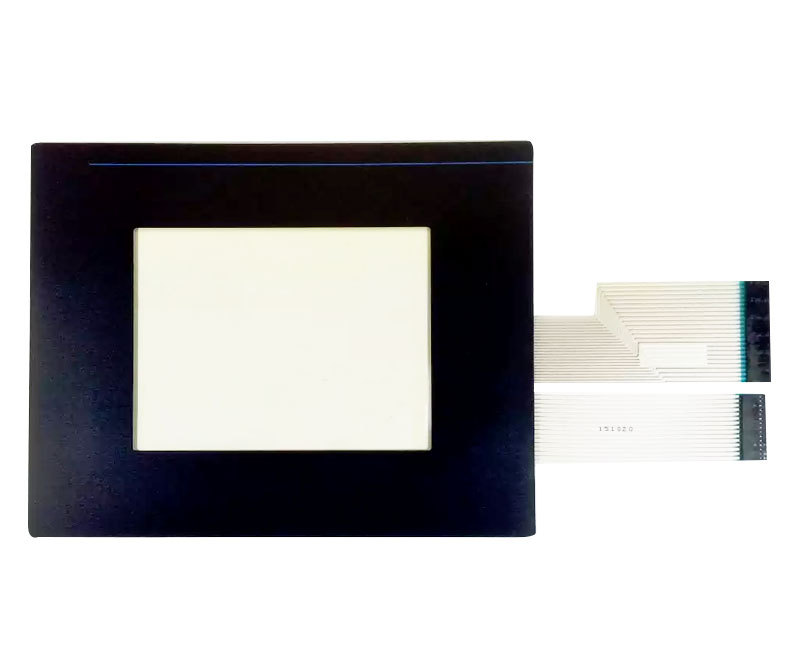
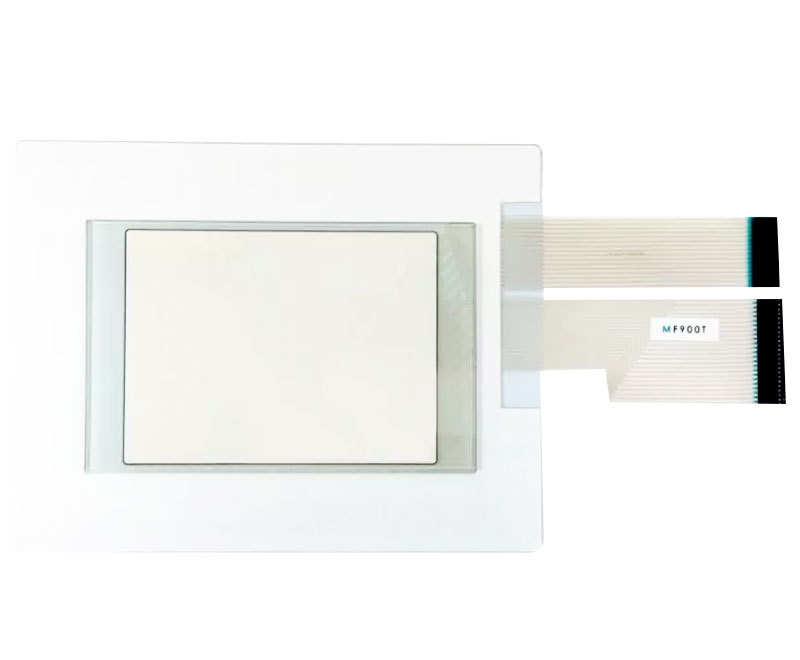
Restore the touchscreen functionality of your industrial operator interface with the Monitech MF900T PanelView 900 Touchscreen Replacement with Overlay. Designed specifically for the Allen-Bradley PanelView 900 COLOR VERSION (2711-T9C), this replacement touchscreen and overlay combination provides a practical solution for replacing worn, damaged, or unresponsive touch components while retaining your existing industrial HMI terminal.
The MF900T touchscreen replacement is intended exclusively for PanelView 900 color display models. It is not compatible with monochrome (amber) versions. If your terminal uses a monochrome display, please select the Monitech MF900AT instead.
| Product Information | Details |
|---|---|
| Product Model | MF900T PanelView 900 Touchscreen Replacement with Overlay |
| Monitech SKU | MF900T |
| Replacement Type | Touchscreen replacement with overlay |
| Original Terminal Part Number | 2711-T9C (PanelView 900 color series) |
| Compatibility | Allen-Bradley PanelView 900 color touchscreen terminals (2711-T9C series) only. Not compatible with monochrome or amber display versions. |
| Features |
|
| Application | Industrial human-machine interfaces (HMIs), manufacturing equipment, automation systems, and machine operator control panels equipped with compatible Allen-Bradley PanelView 900 color touchscreen terminals. |
| What’s Included |
Note: Additional installation accessories, if any, should be confirmed with Monitech before ordering. |
| Important Compatibility Note | COLOR VERSION ONLY. The MF900T is not suitable for PanelView 900 monochrome (amber) terminals. For monochrome versions, use the MF900AT PanelView 900 Touchscreen Replacement. |
| Need Help? | Not sure whether your PanelView 900 is the color or monochrome version? Contact Monitech for assistance confirming compatibility before placing your order. |
Important: Verify your existing PanelView 900 terminal model and display type before ordering. The Monitech MF900T is designed for 2711-T9C color touchscreen models only. Monochrome or amber display terminals require the separately available MF900AT PanelView 900 Monochrome Touchscreen.
Share:

Swapped out the old touch screen with the 2711-T9C from Monitech. Installation was straightforward, and the support team was really helpful.
Upgraded my PanelView 900 with this touchscreen from Monitech. Seamless installation, dependable warranty, and excellent support. Peace of mind with direct from manufacturer purchase.
I recently installed the 2711-T9C Allen Bradley PanelView 900 Touchscreen from Monitech. The setup was straightforward, and the touchscreen's responsiveness improved our machine's interface significantly.
Promo ends in
US$ 399.00
Restore the touchscreen functionality of your industrial operator interface with the Monitech MF900T PanelView 900 Touchscreen Replacement with Overlay. Designed specifically for the Allen-Bradley PanelView 900 COLOR VERSION (2711-T9C), this replacement touchscreen and overlay combination provides a practical solution for replacing worn, damaged, or unresponsive touch components while retaining your existing industrial HMI terminal.
The MF900T touchscreen replacement is intended exclusively for PanelView 900 color display models. It is not compatible with monochrome (amber) versions. If your terminal uses a monochrome display, please select the Monitech MF900AT instead.
| Product Information | Details |
|---|---|
| Product Model | MF900T PanelView 900 Touchscreen Replacement with Overlay |
| Monitech SKU | MF900T |
| Replacement Type | Touchscreen replacement with overlay |
| Original Terminal Part Number | 2711-T9C (PanelView 900 color series) |
| Compatibility | Allen-Bradley PanelView 900 color touchscreen terminals (2711-T9C series) only. Not compatible with monochrome or amber display versions. |
| Features |
|
| Application | Industrial human-machine interfaces (HMIs), manufacturing equipment, automation systems, and machine operator control panels equipped with compatible Allen-Bradley PanelView 900 color touchscreen terminals. |
| What’s Included |
Note: Additional installation accessories, if any, should be confirmed with Monitech before ordering. |
| Important Compatibility Note | COLOR VERSION ONLY. The MF900T is not suitable for PanelView 900 monochrome (amber) terminals. For monochrome versions, use the MF900AT PanelView 900 Touchscreen Replacement. |
| Need Help? | Not sure whether your PanelView 900 is the color or monochrome version? Contact Monitech for assistance confirming compatibility before placing your order. |
Important: Verify your existing PanelView 900 terminal model and display type before ordering. The Monitech MF900T is designed for 2711-T9C color touchscreen models only. Monochrome or amber display terminals require the separately available MF900AT PanelView 900 Monochrome Touchscreen.
Interested in Net 30 Payment Terms or have questions in mind? Contact us for further details:
|
|---|
Restore the touchscreen functionality of your industrial HMI with the Monitech MF900T PanelView 900 Touchscreen Replacement with Overlay. Specifically designed for the Allen-Bradley PanelView 900 color terminal (2711-T9C), this replacement assembly provides a practical solution for worn, damaged, or unresponsive touchscreens, helping extend the service life of your existing industrial control equipment.
The MF900T includes a replacement touchscreen and overlay for compatible PanelView 900 color operator terminals. Whether your existing touchscreen has become unresponsive, developed physical damage, or requires replacement due to wear, this product offers a targeted repair solution without the need to replace the complete HMI terminal.
Designed for use in industrial automation environments, including manufacturing equipment, production machinery, and machine control systems, the PanelView 900 touchscreen replacement helps maintenance teams and technicians restore an essential operator interface component.
Important Compatibility Information: The MF900T works ONLY with the COLOR version of the Allen-Bradley PanelView 900 (2711-T9C). It is not compatible with monochrome or amber display terminals. If your PanelView 900 uses a monochrome display, you will need the MF900AT touchscreen replacement instead.
Why Choose the Monitech MF900T?
Before Ordering: Check the model number on your existing PanelView 900 terminal and confirm that it is the 2711-T9C color version. If you are unsure whether your unit requires the MF900T or MF900AT, contact Monitech for compatibility assistance.
| Product Description | 2711-T9C Allen Bradley Panelview 900 Touchscreen with Overlay |
|---|---|
| Condition | New: A brand-new, unused, unopened, undamaged item in its original packaging (where packaging is applicable). |
| Brand | Allen-Bradley |
| SKU | MF900T |
| Compatibility | 2711-T9C Panelview 900 (Color Version Only) |
| Model | 2711-T9C Panelview 900 |
| Controller Platform | 2711-T9C Panelview 900 |
| Accessories | Touchscreen replacement with overlay. Please contact Monitech to confirm whether additional installation accessories are included. |
| Type | Touchscreen Replacement with Overlay |
| UPC | Does Not Apply |
| EAN | Does Not Apply |
| Warranty | Read our warranty details for our products: TERMS OF WARANTY |
| Return | Returns are accepted. Our standard return policy includes a 10% restocking fee. However, please contact us for more information. |
| Support | Click here to make a request for customer service. |
The Monitech MF900T is a replacement touchscreen with overlay designed for the Allen-Bradley PanelView 900 color terminal (2711-T9C). It provides the touchscreen and overlay components needed to replace worn, damaged, or unresponsive touch assemblies. The product is intended for touchscreen replacement rather than replacement of the entire PanelView terminal or LCD display. For information about additional installation accessories or cables, please contact Monitech before ordering.
The MF900T touchscreen replacement is designed specifically for the Allen-Bradley PanelView 900 color touchscreen series, 2711-T9C. It is not compatible with the monochrome or amber display versions. Before purchasing, check the model number on your existing terminal's identification label and confirm that it belongs to the 2711-T9C color series. If your terminal is a 2711-T9A or 2711-T9A8 monochrome model, you should consider the Monitech MF900AT monochrome touchscreen replacement instead.
The main difference is the PanelView 900 display version each touchscreen supports.
These replacement parts should not be treated as interchangeable. Selecting the correct touchscreen is important for physical and electrical compatibility. If your existing terminal uses an amber or monochrome display, choose the MF900AT touchscreen replacement rather than the MF900T.
A PanelView 900 touchscreen replacement may be necessary when the touch interface becomes unreliable or physically damaged. Common symptoms include:
These symptoms can indicate a damaged touchscreen, but they may also result from loose connections, calibration problems, or other terminal faults. Before replacing the touchscreen, inspect the terminal and have a qualified technician confirm the likely cause.
Yes, if the touchscreen assembly is the faulty component and the remaining terminal is functioning properly. The Monitech MF900T provides a touchscreen and overlay replacement for compatible 2711-T9C color terminals. This allows maintenance teams to address touchscreen-related damage without automatically replacing the complete operator interface. However, if the LCD, controller electronics, or other internal components are also defective, additional repairs may be required. A proper diagnosis helps avoid unnecessary replacement costs and equipment downtime.
The MF900T PanelView 900 touchscreen replacement is intended for installation by qualified maintenance personnel or technicians familiar with industrial HMI equipment. Replacing the touchscreen generally involves safely powering down the terminal, accessing the existing touch assembly, removing the damaged components, and installing the compatible replacement.
Important: Follow the equipment manufacturer's electrical safety and lockout/tagout procedures before opening the terminal. Handle internal cables and connectors carefully, and confirm the correct orientation and connections before restoring power. Contact Monitech technical support if you need installation guidance or confirmation of included accessories.
Replacing the touchscreen may resolve unresponsive or inaccurate touch input if the touchscreen assembly itself is defective. A damaged touch sensor, deteriorated overlay, or faulty touch connection can prevent an otherwise functional PanelView 900 terminal from registering operator commands correctly.
However, touchscreen problems can also be caused by calibration issues, damaged connectors, wiring faults, or internal electronics. If your PanelView 900 display still shows normal graphics but does not respond to touch, have a qualified technician inspect the touchscreen and its connections before ordering. Replacing the touchscreen will not correct unrelated LCD or controller failures.
The Monitech MF900T replaces the touchscreen and overlay of a compatible Allen-Bradley PanelView 900 2711-T9C color terminal. It is not a complete LCD display replacement kit.
The LCD is responsible for displaying graphics, text, and operational information, while the touchscreen detects operator input. If your PanelView 900 has a visible image but the touch function is defective, the MF900T may be the appropriate replacement. If the screen is blank, dim, discolored, or has missing image sections, the issue may involve the LCD, backlight, or other internal electronics. For help identifying the correct part, contact Monitech with your terminal model and a description of the problem.
The Monitech MF900T PanelView 900 touchscreen replacement is subject to Monitech's applicable product warranty and return policies. For warranty coverage, eligibility, and applicable conditions, please review the Monitech Terms of Warranty.
Returns are accepted subject to the applicable return policy, including a standard 10% restocking fee as stated in the product information. Before returning a product, contact Monitech customer support to confirm return eligibility, instructions, and any applicable charges.
You can contact Monitech for assistance selecting the correct touchscreen replacement for your Allen-Bradley PanelView 900 terminal.
To help the support team identify the appropriate product, provide:
For the 2711-T9C color PanelView 900, the recommended touchscreen replacement is the MF900T. For monochrome or amber models, review the MF900AT touchscreen replacement. Verifying your terminal before purchase helps reduce compatibility issues, unnecessary returns, and maintenance delays.
We are one message away or call us from Monday to Friday.
Guest –
I recently installed the 2711-T9C Allen Bradley PanelView 900 Touchscreen from Monitech. The setup was straightforward, and the touchscreen’s responsiveness improved our machine’s interface significantly.
Guest –
Upgraded my PanelView 900 with this touchscreen from Monitech. Seamless installation, dependable warranty, and excellent support. Peace of mind with direct from manufacturer purchase.
Guest –
Swapped out the old touch screen with the 2711-T9C from Monitech. Installation was straightforward, and the support team was really helpful.