






Promo ends in
US$ 413.00
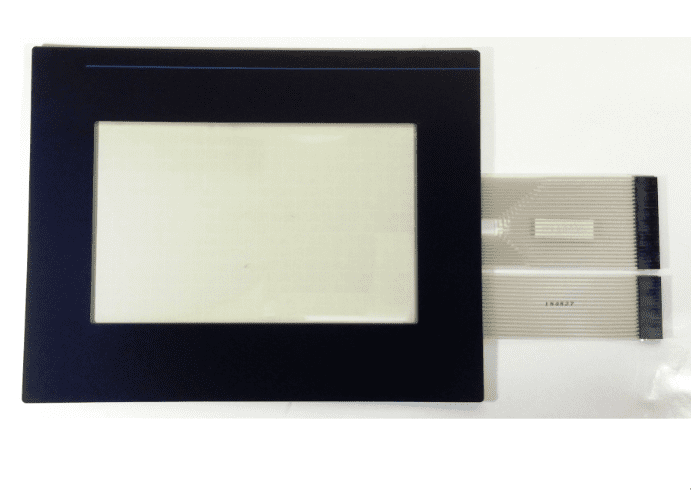
Restore touchscreen functionality to your industrial HMI with the PanelView 900 Touchscreen for 2711-T9A Amber Version (MF900AT). This replacement touchscreen is designed for the Allen-Bradley PanelView 900 amber/monochrome terminal, including model 2711-T9A8. The Monitech MF900AT provides a replacement option for a worn, damaged, or unresponsive touchscreen, helping maintain operator interaction with your existing industrial control equipment.
| Product Information | Details |
|---|---|
| Product Model | PanelView 900 Touchscreen for 2711-T9A Amber Version (MF900AT) |
| Monitech Part Number | MF900AT |
| Replacement Type | Touchscreen replacement for industrial HMI terminals |
| Original Terminal Model | Allen-Bradley PanelView 900 2711-T9A series, including 2711-T9A8 |
| Compatibility | Designed for the Allen-Bradley PanelView 900 amber/monochrome touchscreen version. Confirm the full terminal model number before ordering. |
| Display Version | Amber / Monochrome PanelView 900 terminal |
| Features |
|
| Application | Touchscreen repair and maintenance for Allen-Bradley PanelView 900 amber/monochrome HMIs used in industrial machinery, manufacturing equipment, and operator control panels. |
| What’s Included | MF900AT replacement touchscreen. Additional accessories or installation components have not been specified; contact Monitech to confirm package contents. |
| Important Compatibility Note | The MF900AT is intended for the amber/monochrome PanelView 900 version. Do not assume compatibility with color-display versions or other PanelView models. Verify your terminal identification before purchasing. |
| Need Help? | Not sure whether the MF900AT is compatible with your PanelView terminal? Contact Monitech for assistance with product compatibility and replacement selection. |
Share:

I replaced our PanelView 900 touchscreen with the MF900AT and it was a seamless fit. Ordering directly from Monitech was reassuring with their expert support and solid warranty—a stark contrast to previous third-party vendors. The clarity
Promo ends in
US$ 413.00
Restore touchscreen functionality to your industrial HMI with the PanelView 900 Touchscreen for 2711-T9A Amber Version (MF900AT). This replacement touchscreen is designed for the Allen-Bradley PanelView 900 amber/monochrome terminal, including model 2711-T9A8. The Monitech MF900AT provides a replacement option for a worn, damaged, or unresponsive touchscreen, helping maintain operator interaction with your existing industrial control equipment.
| Product Information | Details |
|---|---|
| Product Model | PanelView 900 Touchscreen for 2711-T9A Amber Version (MF900AT) |
| Monitech Part Number | MF900AT |
| Replacement Type | Touchscreen replacement for industrial HMI terminals |
| Original Terminal Model | Allen-Bradley PanelView 900 2711-T9A series, including 2711-T9A8 |
| Compatibility | Designed for the Allen-Bradley PanelView 900 amber/monochrome touchscreen version. Confirm the full terminal model number before ordering. |
| Display Version | Amber / Monochrome PanelView 900 terminal |
| Features |
|
| Application | Touchscreen repair and maintenance for Allen-Bradley PanelView 900 amber/monochrome HMIs used in industrial machinery, manufacturing equipment, and operator control panels. |
| What’s Included | MF900AT replacement touchscreen. Additional accessories or installation components have not been specified; contact Monitech to confirm package contents. |
| Important Compatibility Note | The MF900AT is intended for the amber/monochrome PanelView 900 version. Do not assume compatibility with color-display versions or other PanelView models. Verify your terminal identification before purchasing. |
| Need Help? | Not sure whether the MF900AT is compatible with your PanelView terminal? Contact Monitech for assistance with product compatibility and replacement selection. |
Interested in Net 30 Payment Terms or have questions in mind? Contact us for further details:
|
|---|
Restore the touchscreen functionality of your industrial operator interface with the Monitech MF900AT PanelView 900 Touchscreen Replacement, designed specifically for the Allen-Bradley PanelView 900 amber/monochrome series, including models 2711-T9A and 2711-T9A8. This replacement touchscreen provides a practical solution for repairing worn, damaged, or unresponsive touch panels, helping extend the service life of your existing industrial HMI without replacing the entire terminal.
Engineered for compatibility with PanelView 900 monochrome operator interfaces, the MF900AT touchscreen helps restore reliable touch input for machine monitoring, equipment operation, and industrial process control. It is a suitable replacement option for maintenance technicians, machine operators, and facilities looking to keep their existing Allen-Bradley control systems operational.
Important Compatibility Note: The MF900AT is designed exclusively for the amber/monochrome PanelView 900 version. It is not intended for color-display models. If your terminal uses a color display, please see our MF900T PanelView 900 Color Touchscreen Replacement. Always verify your terminal’s model number before ordering to ensure proper compatibility.
| Product Description | Replacement touchscreen for the Allen-Bradley PanelView 900 amber/monochrome operator interface, designed for 2711-T9A series terminals, including 2711-T9A8. Helps restore touch input functionality on compatible industrial HMI equipment. |
|---|---|
| Condition | New: A brand-new, unused, unopened, undamaged item in its original packaging (where packaging is applicable). |
| Brand | Panelview |
| SKU | MF900AT |
| Compatibility | Allen-Bradley PanelView 900 amber/monochrome touchscreen terminals, including 2711-T9A and 2711-T9A8. Not compatible with color-display versions. |
| Model | MF900AT |
| Controller Platform | Allen-Bradley PanelView 900 Amber/Monochrome Operator Interface (2711-T9A Series) |
| Accessories | All of our products come with an installation guide and a cable kit designed for your machine. Installation is straightforward, with no rewiring or reprogramming required. |
| Type | Touchscreen Replacement |
| UPC | Does Not Apply |
| EAN | Does Not Apply |
| Warranty | Read our warranty details for our products: TERMS OF WARRANTY |
| Return | Returns are accepted. Our standard return policy includes a 10% restocking fee. However, please contact us for more information. |
| Support | Click here to make a request for customer service. |
The Monitech MF900AT is a replacement touchscreen designed for the Allen-Bradley PanelView 900 amber/monochrome operator interface, including models 2711-T9A and 2711-T9A8. It helps restore touchscreen input functionality when the original touch panel becomes worn, damaged, or unresponsive. This replacement allows maintenance teams to repair the existing industrial HMI instead of replacing the entire terminal, provided the other components remain functional.
The MF900AT touchscreen is designed specifically for Allen-Bradley PanelView 900 amber/monochrome terminals, including the 2711-T9A and 2711-T9A8. It is not intended for PanelView 900 color-display or keypad-only versions. Before ordering, check the catalog number on your terminal's identification label and confirm that your unit has an amber/monochrome display. If you are unsure about compatibility, contact Monitech for assistance.
The main difference is the PanelView 900 display version each touchscreen supports. The MF900AT is designed for the amber/monochrome PanelView 900, while the MF900T is intended for the color-display version. These replacements should not be treated as interchangeable. If your terminal has an amber/monochrome screen, choose the MF900AT. For color-display terminals, see the MF900T PanelView 900 Color Touchscreen Replacement and verify compatibility with your exact model.
Common signs of a failing PanelView 900 touchscreen include touch inputs that do not register, intermittent responses, difficulty selecting on-screen controls, physical damage, or areas of the screen that no longer respond to touch. Before replacing the touchscreen, check whether the display still produces a readable image and whether the problem is limited to touch input. A blank or distorted display may indicate a separate LCD, backlight, power, or internal electronics issue. The MF900AT is intended to address touchscreen-related failures, not unrelated display or controller faults.
The MF900AT replacement package includes a touchscreen designed for the compatible PanelView 900 amber/monochrome terminal. Monitech's product information also indicates that an installation guide and a machine-specific cable kit are provided. Before purchasing, confirm the current package contents with Monitech, particularly if you require an overlay, additional installation accessories, or replacement components beyond the touchscreen itself.
The MF900AT touchscreen replacement is intended to restore the original touch-input function of a compatible Allen-Bradley PanelView 900. Under normal touchscreen-only replacement conditions, PLC reprogramming or changes to the existing HMI application are not expected. Monitech describes the replacement as requiring no rewiring or reprogramming when installed as intended. However, follow the supplied installation instructions and confirm the correct connection configuration before installation. If your terminal has additional electrical or controller faults, further troubleshooting may be necessary.
Yes. The MF900AT PanelView 900 touchscreen is intended for field replacement by personnel experienced in maintaining industrial HMI equipment. Installation involves accessing the terminal, removing the existing touchscreen component, and fitting the replacement according to the supplied instructions. Before beginning, disconnect power, follow applicable lockout/tagout procedures, and observe electrostatic discharge precautions. The specific tools and disassembly steps depend on the terminal's condition and configuration. If you need installation assistance, contact Monitech support.
The MF900AT may resolve an unresponsive PanelView 900 2711-T9A or 2711-T9A8 when the problem is caused by a defective or damaged touchscreen. If the display image is visible but touch commands do not register correctly, a touchscreen fault is one possible cause. However, similar symptoms can result from loose connections, damaged internal circuitry, or other hardware issues. If the replacement touchscreen does not resolve the problem, additional terminal diagnostics may be required. Identifying the cause before ordering can help avoid unnecessary replacement costs and equipment downtime.
Yes. If the existing Allen-Bradley PanelView 900 amber/monochrome HMI is otherwise operational and the touchscreen is the defective component, the MF900AT replacement touchscreen provides an alternative to replacing the complete terminal. Replacing the failed touch component can help preserve your existing machine interface and reduce the cost and disruption associated with a complete HMI replacement. It can also help maintain older industrial equipment where replacing the entire operator interface may require additional compatibility checks, configuration work, or system modifications.
The Monitech MF900AT PanelView 900 touchscreen replacement is subject to Monitech's applicable product warranty and return policies. For warranty coverage and exclusions, review the Monitech Terms of Warranty. Returns may be subject to a restocking fee under the standard return policy. Shipping options, delivery times, and availability depend on your destination and the current product stock. To confirm compatibility, warranty coverage, shipping arrangements, or return eligibility before ordering, please contact Monitech customer support.
We are one message away or call us from Monday to Friday.
Guest –
I replaced our PanelView 900 touchscreen with the MF900AT and it was a seamless fit. Ordering directly from Monitech was reassuring with their expert support and solid warranty—a stark contrast to previous third-party vendors. The clarity