






News and Updates
TL;DR
Allen Bradley PanelView terminals from the 1990s and 2000s have three replacement paths: OEM Rockwell parts, aftermarket replacements, or used/refurbished units. For most facilities, aftermarket replacements offer the best balance of cost, availability, and lead time – especially for backlights and touch overlays. This guide breaks down the options by model and by failure type so you can make the right call for your facility.
If you are managing a fleet of PanelView terminals, you already know that these units do not fail on a schedule. They fail at the worst possible moment. This guide gives you the information to get ahead of that – by model, by failure type, and by the numbers – so your next replacement decision is planned, not panicked.
The three replacement paths for any PanelView upgrade have real differences in cost, lead time, and risk. Here is what each one actually means in practice.
OEM Rockwell Automation: Parts sourced directly from Rockwell. Guaranteed OEM compatibility, but at a significant cost premium – aftermarket LCD replacements for industrial HMI terminals typically cost 60-80% less than OEM pricing. For older PanelView 550 and 600 components, some OEM parts are discontinued entirely, making price a secondary concern.
Aftermarket replacements: Third-party components engineered to fit and function as direct replacements for specific PanelView models. Typically in stock, ship within 24 hours, and cost significantly less than OEM. Quality varies by supplier – a specialist in industrial display replacement with 20 years of field history is a different proposition from a generic marketplace reseller.
Used/refurbished: Pulls from other machines, rebuilt units, or surplus inventory. The lowest upfront cost, but with no warranty and unknown service history. A used terminal that fails in six months costs more than buying right the first time.
| Option | Typical Cost | Lead Time | Warranty | Risk |
|---|---|---|---|---|
| OEM Rockwell | [PRICE: verify with Rockwell] | 6-12+ weeks for older models | Manufacturer warranty | Low compatibility risk; high cost and downtime risk |
| ✓ Monitech Aftermarket | 60-80% less than OEM (typical range) | In stock; ships within 24 hours | Monitech Standard Warranty | Low – engineered to spec for specific models |
| Used / Refurbished | Lowest upfront | Variable | None or limited | High – unknown service history, no recourse on failure |
For most facilities making a proactive upgrade decision, aftermarket replacements offer the best combination of cost, availability, and risk management. OEM is worth the premium only when a maintenance contract explicitly requires it, or when you are replacing a newer PanelView model still in active Rockwell support. Used units make sense when no other option exists.
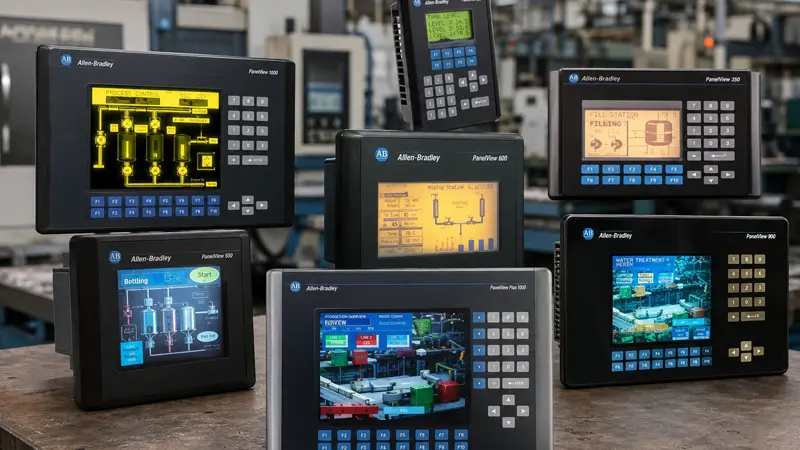
The PanelView 550 is one of the most widely deployed Allen Bradley operator terminals in North American manufacturing. Part number series: 2711-NL1, 2711-NL2, 2711-NL3, 2711-NL6, and 2711-B5xx variants.
The backlight is the most common repair on the PanelView 550 – and the most cost-effective one. Replace the CCFL backlight bulb before reduced output has time to damage the LCD panel.
Running a dimming backlight accelerates LCD degradation. Replacing the backlight now costs a fraction of what it costs to replace the backlight and the panel later.
Monitech stocks the 2711-NL1 backlight bulb (MB550E) – the single highest-volume PanelView replacement by order count, with repeating demand from maintenance programs across North America. If you are running a scheduled replacement program on PanelView 550 units, this is the part to stock.
If the LCD panel has already failed, the full panel assembly with backlight (M256128C) is also available. For facilities that want a ready-to-install solution with no component-level work, the complete PanelView 550 terminal assembly – front bezel and back panel (MC550BL) – gets units back online faster.
OEM status: Some 2711-NL series components are discontinued at the OEM level. If Rockwell cannot supply the part, aftermarket is the only path short of scrapping the terminal.
Ready to order PanelView 550 parts? Go directly to the product page.
The PanelView 600 shares a generation with the 550 and appears in similar industrial environments. Part number series: 2711-B6xx, 2711-K6xx, and 2711C-Txx variants.
The touchscreen overlay can be replaced independently from the LCD panel. If your display image is clear but touch response has degraded, you do not need a full display replacement – you need an overlay. For a fleet manager, that distinction is worth knowing before you order. One targeted repair versus a full assembly makes a real difference across multiple units.
Monitech stocks the LED backlight replacement for the PanelView 600 (MB600LED) – an upgrade from the aging CCFL to a longer-lasting LED backlight. LED backlights are more efficient and outlast CCFL by a wide margin, which matters when you are trying to reduce how often you touch these units. For terminals where both touch and display need replacement, the PanelView 600 LCD, touchscreen, and keypad replacement assembly (MC600B-PGOL) handles it in one order. The PanelView Plus 600 touch screen with front and back bezel (MC600PTB-PG) covers Plus-generation 600 units.
Ready to order PanelView 600 parts? Go directly to the product page.
The PanelView 1000 is a larger terminal, deployed in facilities where operators need more screen area for complex machine interfaces. Part number series: 2711-T10xx and 2711P-T10xx variants.
The touch overlay is the most common replacement on the PanelView 1000. Monitech stocks the LED backlight for the 2711-NL6-10 (MB1000LEDS-V2) and the PanelView Plus 1000 touchscreen assembly for 2711P-T10 and 2711P-RDT10C units (MF1000PT).
If your PanelView 1000 has gone fully dark – no backlight, no image – and touch response has also failed, a full assembly replacement is more cost-effective than addressing components individually. Check the product page for current assembly options, or call 519-725-2222 to confirm which replacement fits your specific unit.
Ready to order PanelView 1000 parts? Go directly to the product page.
The PanelView Plus series (Plus 6 and Plus 7) is a different generation from the 550, 600, and 1000. If you are managing a mixed fleet, do not assume parts compatibility across generations.
Key difference for upgrade planning: The PanelView Plus series runs Windows CE-based software. Replacing the touch overlay or LCD does not affect the control software or PLC communication – you are replacing display hardware only, not the terminal’s computing or communication layer. No Rockwell FactoryTalk or RSLogix programming changes are required.
Monitech stocks touch screen and overlay assemblies for the PanelView Plus 7 in four sizes:
Upgrade complexity on PanelView Plus units is higher than on the 550/600/1000 generation because of the Windows CE environment and wider model variation. If you are upgrading a Plus terminal and are uncertain which part matches your specific model number, contact us before ordering.
The part number tells you what you have. PanelView terminals carry the model number on the front bezel label and on the back panel.
The format: 2711-[series identifier]-[options]
| What you see | What it means |
|---|---|
| 2711-NL1, NL2, NL3, NL6 | PanelView 550 – NL series |
| 2711-B5xx or 2711-K5xx | PanelView 550 – B/K series (different comms) |
| 2711-B6xx or 2711-K6xx | PanelView 600 |
| 2711-T10xx | PanelView 1000 |
| 2711P- prefix | PanelView Plus generation |
| 2711P-T10xx | PanelView Plus 1000 |
| 2711P-T12xx, 2711P-T19xx | PanelView Plus 7 (12″ and larger) |
The characters after the model designator – for example, B6 or K6 – indicate the communication interface (DH-485, DH+, DeviceNet). This does not affect display compatibility but does affect how the terminal communicates with the PLC. It matters if you are swapping a complete terminal rather than replacing just the display components.
If your part number is worn, obscured, or your terminal is a non-standard variant, upload a photo to Monitech’s photo search tool and the system will identify compatible parts from the image.
Reactive replacement – waiting for each unit to fail before ordering – has a cost that is easy to undercount until you add it up.
Every unplanned failure means unplanned downtime. A single PanelView stopping a production line for a full shift costs far more than the replacement part. Multiply that across a fleet of aging terminals, and the math changes quickly. CCFL backlights – the Cold Cathode Fluorescent Lamp technology in older PanelView displays – have a rated service life of approximately 30,000-50,000 hours. At a single-shift schedule, that is 7-12 years before significant dimming begins. Most PanelView 550 and 600 terminals currently in service are well past that threshold.
A proactive replacement program works differently. Audit your fleet by model and estimated operating hours. Identify units at or near end-of-backlight-life. Replace on a maintenance schedule – before failure, not after. The result is planned downtime measured in minutes, not unplanned downtime measured in shift-hours.
Proactive replacement also simplifies your parts inventory. A facility running six PanelView 550 units and four PanelView 600 units needs two SKUs on the shelf. Emergency one-off orders at irregular intervals cost more per part and more in downtime waiting for delivery.
Monitech works directly with maintenance teams and purchasing departments on multi-unit programs – consistent pricing, consistent parts, and a supplier that knows these terminals. Call 519-725-2222 or contact us to discuss a quote based on your model mix and fleet size. If you are also managing CRT-based displays elsewhere in your facility, see our guide to CRT-to-LCD upgrade options for a parallel overview.
QWhat is the lifespan of a PanelView backlight?
CCFL backlights – the Cold Cathode Fluorescent Lamp technology used in older PanelView LCD panels – have a rated service life of approximately 30,000-50,000 hours. At a standard two-shift industrial schedule, that is roughly 7-12 years before dimming becomes noticeable. Terminals running continuous 24/7 operations reach end-of-backlight-life faster. Dimming is progressive – a noticeably dim terminal is already past peak backlight output.
QIs it cheaper to replace the backlight or the full display?
Replacing the backlight is significantly cheaper in most cases, and it is the right call when the LCD panel itself is still functioning correctly – clear image, no dead zones or discoloration. A backlight replacement restores full brightness at a fraction of the cost of a full display assembly. If the LCD has also failed, replacing both components separately typically costs more than a full assembly replacement, so evaluate both options before ordering.
QCan I replace a PanelView display without a systems integrator?
Yes, for backlight and touch overlay replacements in most cases. Monitech’s PanelView replacements are direct-fit – same physical footprint, same connectors. You are replacing the display hardware only. No Rockwell FactoryTalk or RSLogix programming is required for a backlight or overlay swap. Complete terminal assembly replacements require a basic electrical background for most models. If you are uncertain before ordering, call 519-725-2222 – we can confirm what the installation involves for your specific model.
QDoes Monitech offer bulk pricing for multiple units?
Yes. Monitech works directly with plant maintenance teams, purchasing departments, and resellers on multi-unit programs. Consistent parts, consistent pricing, and a supplier that has been doing this since 2006. Pricing is based on model mix and order volume – call 519-725-2222 or contact us through monitech.com to get a quote.
If you know your PanelView model, go directly to the product page.
Find the right replacement for your PanelView terminal – backlights, touch overlays, and full assemblies in stock and ready to ship.
PanelView 550 Replacements
PanelView 600 Replacements
PanelView 1000 Replacements
Upload a photo to identify your part
For multi-unit programs or bulk orders, call Monitech directly at 519-725-2222. Monitech has been specializing in industrial LCD replacement since 2006 and serves maintenance teams and plant operations across North America.
NEED TO REPLACE YOUR DISPLAY?
We have a wide-range of industrial display replacement that fits on your industrial machine.