






News and Updates
TL;DR
A ProtoTrak LCD replacement from Monitech costs $999 on sale (regularly $1,366) for most MX2/MX3/AGE-series controls and $1,045 for M2/M3-series retrofit kits, with parts in stock and no 6-12 week wait. Most installations take two to four hours and do not require a technician.
Your ProtoTrak display is dimming, flickering, or gone dark. You need the machine back. Here’s exactly what your options cost, which controls are covered, and what the installation actually involves – so you can make the call today.
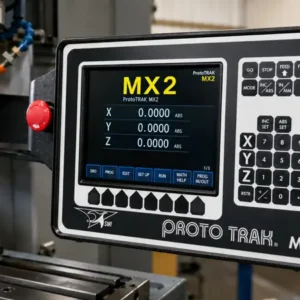
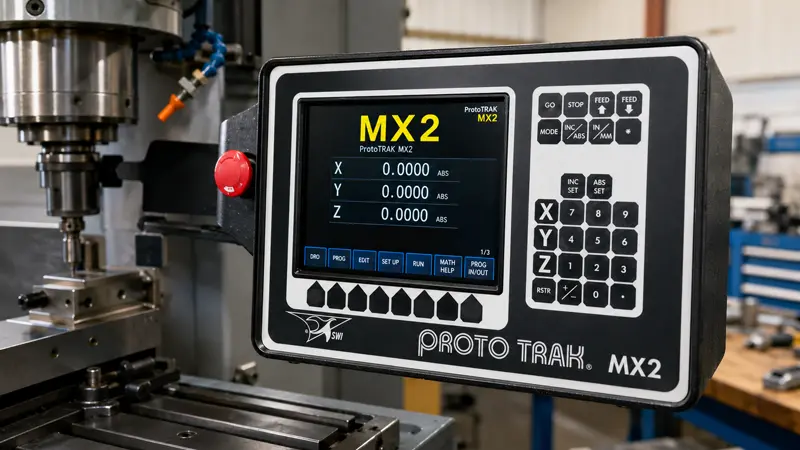
The Monitech aftermarket LCD for a ProtoTrak MX2, MX3, AGE2, or AGE3 costs $999 on sale – regularly $1,366 – (ML084QNMX2). For ProtoTrak M2 and M3 machines, the retrofit LCD upgrade kit is $1,045 (ML080LLM2S for M2, ML080LLM3S for M3). Those are the most common ProtoTrak replacements Monitech ships.
SWI OEM displays carry a 6-12 week lead time. For a mill that’s down, that wait is often the bigger problem.
Used screens from surplus channels look cheaper upfront. But there’s no warranty, and no way to know how many hours are already on the backlight. A used display that fails six months later costs more than buying right the first time.
| Replacement Option | Typical Cost | Lead Time | Warranty | Risk Level |
|---|---|---|---|---|
| ✓ Monitech Aftermarket (MX2/MX3/AGE) | $999 on sale (reg. $1,366) | In stock; ships within 24 hours | Monitech warranty — see terms | Low – direct fit, engineered to spec |
| ✓ Monitech Aftermarket (M2 / M3 Retrofit Kit) | $1,045 | In stock; ships within 24 hours | Monitech warranty — see terms | Low – direct fit, no machine modification |
| SWI OEM Replacement | Requires SWI quote | 6-12 weeks | Manufacturer warranty | Low compatibility risk; high cost and downtime risk |
| Used / Refurbished | Lowest upfront | Variable | None or limited | High – unknown service history, no recourse on failure |
For most shops, the aftermarket replacement is the obvious call: lower cost, ships now, fits directly.
Monitech’s ProtoTrak LCD replacements cover these SWI control families:
The ML084QNMX2 fits the MX2, MX3, AGE2, AGE3, LX2, and LX3. The ML080LLM2S is the kit for M2 machines, and the ML080LLM3S covers M3 machines – both $1,045.
Not sure which one is yours? Call 519-725-2222 or use the photo search tool – upload a photo of your display and Monitech will match it for you.
Your ProtoTrak’s model and serial number are on the nameplate on the control cabinet – usually on the side or rear of the housing. More on that in the FAQ below.
ProtoTrak controls are built tough. The electronics in most of these machines will outlast the people running them. The display is a different story.
Backlight lifespan: Older ProtoTrak LCD panels use CCFL backlights – Cold Cathode Fluorescent Lamps, the same technology that lit laptop screens before LED. CCFLs are rated for roughly 30,000-50,000 hours. On a single-shift schedule, that’s 12-20 years. Many ProtoTrak mills in service today are past that point.
Heat cycling wears things out. The display sits near the control cabinet. It heats up and cools down with every production cycle. That thermal stress ages the backlight assembly and the LCD’s internals faster than the hours alone would suggest.
Hours add up fast in busy shops. The display is on whenever the machine is on. A shop running two shifts can log 4,000 hours a year. That’s past the low end of rated backlight life in under eight years.
The failure follows the same pattern every time: dims gradually, then unevenly, then dark patches appear, then the whole thing goes. None of it reverses. The only question is whether you replace it on your schedule or on the display’s schedule.
This is a display swap, not a controller job. You do not need to reprogram anything. The ProtoTrak control doesn’t know the screen changed – it just sees the same connectors, the same signal, the same image.
How long does it take? Two to four hours the first time. Shops that have done one before get it under two hours.
Do you need a technician? No. A maintenance tech or experienced CNC operator can handle this. If anything about your specific setup looks unusual, call 519-725-2222 before you start – Monitech can walk through it with you.
For a broader look at how CRT-to-LCD conversion kits work across different machine types, see CRT-to-LCD conversion kits – how they work and what to look for.
A dimming ProtoTrak display doesn’t stabilize. It has four stages, and they only go one direction.
Order after failure and the mill sits idle for a month and a half before the part even arrives. SWI OEM lead times run 6-12 weeks. Order an aftermarket replacement at the first sign of dimming – while the machine is still running – and downtime is one planned afternoon, not an unplanned month.
The display is usable but noticeably dim. Operators lean in to read coordinates under shop lights. Small mistakes start happening.
Dark patches appear as the backlight output becomes uneven. Parts of the screen are hard to read.
The display goes dark and recovers. Or it flickers on startup. Failure is close.
The display goes dark. The ProtoTrak controller is fine – the machine’s CNC brain is intact – but without a working display, you can’t run the machine.
An Ontario machine shop had two ProtoTrak MX2 mills going dim at the same time. Not a coincidence – they’d been bought together and run the same hours.
The maintenance tech didn’t wait. He ordered two ML084QNMX2 units from Monitech. Both arrived in a few days. He blocked a Saturday afternoon and swapped both displays back to back.
Total downtime: one Saturday afternoon. Total cost for both displays: $1,998 on sale (regularly $2,732).
The alternative was two SWI OEM displays, 6-12 weeks out. That’s months of degraded displays followed by two machines potentially down at once.
Both mills were back at full brightness before Monday morning.
Monitech has specialized in industrial LCD replacement since 2006 and ships to machine shops and maintenance teams across North America. ProtoTrak replacements are one of the most frequently ordered products. These aren’t obscure parts – they’re in stock and they ship fast.
Ready to get your ProtoTrak back to full brightness?
Not sure which display fits your machine? Call 519-725-2222 – we’ll confirm compatibility before you order.
QHow long does a ProtoTrak LCD replacement take to install?
Two to four hours for a maintenance tech or experienced CNC operator doing it the first time. You’re removing the front panel, swapping the display, reconnecting the same cables, and powering up. No controller programming required. Shops that have done it before finish in under two hours.
QWill the replacement display work with my ProtoTrak’s existing software?
Yes. Monitech’s ProtoTrak LCD replacements plug into the same connectors and receive the same signal as the original. No software changes, no reprogramming, no recalibration. The controller doesn’t know the screen changed.
QWhere can I find my ProtoTrak model and serial number?
Look for the nameplate on the control cabinet – usually on the side or rear of the housing. On older mills, the model is sometimes printed on the front face of the control. If the nameplate is worn or missing, call Monitech at 519-725-2222 with the machine’s approximate age and a description. Most ProtoTrak controls can be identified from context.
QIs an aftermarket display as reliable as OEM?
Monitech’s ProtoTrak replacements are built to the same display specifications – same screen size, same connectors, same signal compatibility. The SWI original and the Monitech replacement both come from the industrial display supply chain. The difference is the OEM markup and the wait. Monitech has been supplying industrial display replacements since 2006. If anything doesn’t look right after installation, call 519-725-2222 – the support team can troubleshoot your specific setup.
NEED TO REPLACE YOUR DISPLAY?
We have a wide-range of industrial display replacement that fits on your industrial machine.